 StageLogger
The simplest, most effective rally data logger
Record Every Stage
StageLogger uses your iPhone or iPod to ensure you have the best chance of capturing every moment. With automatic or manual recording and the storage capacity of the iPhone and iPod, you can be sure of capturing all of your stages.
Simple to use
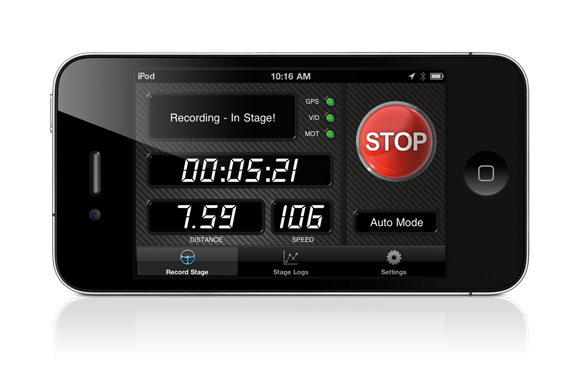
only one button
Press Start and you're away. No complex setup.
Stage Summary
instant feedback
Check your performance at the end of the stage.
Check your stage time, top speed and average speed. Avoid disastrous timing mistakes
Review and Analyze
where ever you are
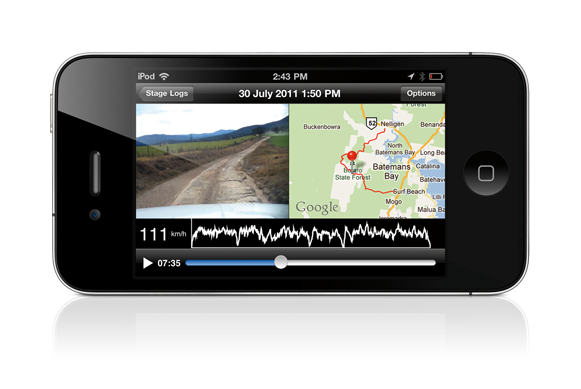
View coordinated video, map and speed information in one display.
Easily find the "interesting" bits. Share your moments immediately with your team and friends
Best Video Settings
optimal focus and exposure
No more over-exposed video or focus constantly shifting from the road to inside the car.
Stagelogger fixes its focus and exposure settings on the road.
Offline Data Analysis
for you data geeks
Delve into your performance data as deeply as you want.
Motion and location logs are stored in a format that can be analysed in programs such as Excel
Recording Mode
never miss a stage
With Auto Recording Mode, just start StageLogger at the start of the day and it will record all of your competitive stages, and none of the extra stuff
Backup Tripmeter
a stage saver
Stagelogger acts as a backup tripmeter showing your cumulative stage distance and speed.
Redundancy for the equipment you absolutely rely on.
Data Logger
go faster!
Along with video, StageLogger records your motion and location data for later analysis.
Ensure you learn the most from every stage...and go faster.
Manage Logs
keep track of your data
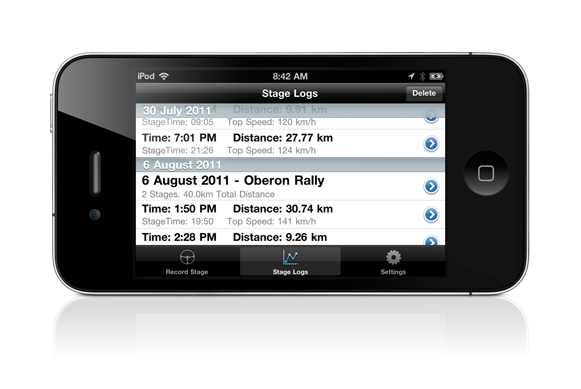
See all of your logs in the app. Upload or delete them from inside the app.
Videos are available in the Photos app to allow full screen playback or transferring to your PC
Simple Upload
get it out there
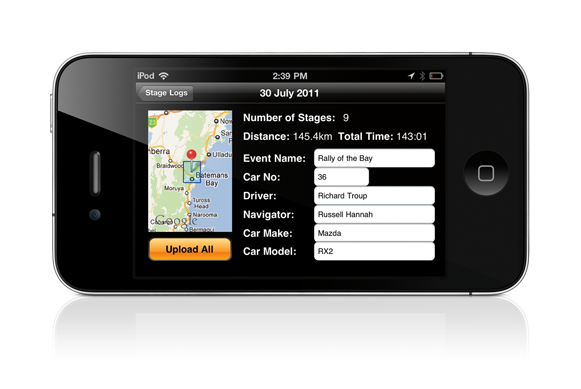
Upload a whole day's stages to Youtube with a single tap and share it with everyone.
Store your video in the cloud. Don't lose it on your hard drive.